If your remote support setup already works well but you’re ready to grow, the hard part isn’t finding more people. The true challenge is keeping what makes your current team reliable: knowledge of your customers’ history, your tools, your tone, and your priorities. Every new person starts without that context, and the more people you add, the more of it can get lost.
For small businesses and established companies alike, this is where scaling remote support gradually goes wrong. Little by little, it shows in customers’ conversations with your team. This checklist helps you ensure conditions that keep context intact as support grows, so you can test your own setup, or any provider you’re considering, before you add anyone new.
Why Scaling Remote Work Can Break What Already Works
The risk is familiar: new people join who don’t yet know the business, handoffs multiply, and work that used to be handled with judgment slides into scripts and ticket queues. Remote work makes this easier to miss. Customers notice the drop in the customer experience, and colleagues feel it, before anyone measures it.
Picture an online store’s customer writing in for the third time about a delayed order. If the person answering can see earlier conversations, the order record, and the carrier update, and knows how the brand talks to customers, they can often settle the issue in one reply. If they can’t, the customer repeats the story from the beginning, and confidence in the brand drops with every repetition.
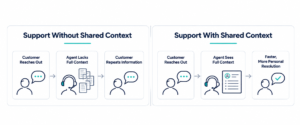
That knowledge is what this article means by context. Context includes the client’s tools, customers, tone, and priorities, plus the history behind each conversation. Many scaling strategies focus on adding processes or new platforms. Keeping context as you scale depends less on adding processes and more on people: choosing the right ones, bringing them into your team properly, and keeping them long enough to build on what they’ve learned.
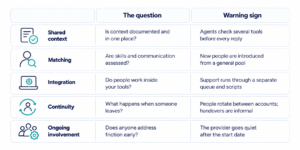
The Checklist at a Glance
How to Use This Checklist With Any Support Team
Start by working through the five sections for your current setup. That may mean an in-house team, a dispersed workforce on a hybrid schedule, or people from a remote staffing company. You can use it the same way for any provider you’re considering. Each item is a condition that protects context as support grows. A missing item is a place where context is likely to leak.
The checklist also helps you understand which factors to discuss with any vendor before you commit, beyond pricing. If you’re interested in a provider, ask them to walk through each section with an example from a current client.
The checklist applies regardless of the business arrangement. Customer support outsourcing covers many scenarios, from relationship-led partnerships to transactional BPO arrangements built around fixed scripts and volume queues. The difference between relationship-led and transactional approaches shows up most clearly in sections 3 to 5.
The Checklist
1. Before adding people: Is context documented and shared across time zones?
[ ] Customer history, order or account records, and earlier conversations sit in one place everyone uses.
[ ] The knowledge base is current, and someone owns keeping it that way.
[ ] Support cases are logged in such a way that the next person can pick them up without asking.
[ ] The team has the right tools, connected rather than multiplied, so nobody hunts across systems for an answer.
[ ] Each function has a defined communication standard: tone, response expectations, when to escalate, and which languages it covers.
[ ] Common situations have written guidance that explains the reasoning, not only the steps.
[ ] You can name where context lives today, and how it will reach the next person who joins.
[ ] Growth is planned in stages, so each new person has time to build context before the next one joins.
New people can only keep context that exists somewhere they can reach it, so before adding anyone, create one place where it lives. Scaling any support model on a thin knowledge base or scattered records only widens the gaps. Hiver’s 2026 B2B customer support benchmark, a survey of more than 500 B2B support professionals, found that 66.8% of complex tickets required a rep to check three or more tools before they could act with full information.
2. Matching: Is everyone assessed for more than technical skill?
[ ] Communication standards are assessed before introduction. Look for clarity, professionalism, and judgment in writing and conversation.
[ ] Cultural alignment and working style are considered alongside skills.
[ ] Language needs are matched to the customers and colleagues the person will actually work with.
[ ] The match is made for the specific function and the people being supported, not from a general pool.
[ ] You meet and approve the person before they start.
[ ] For an in-house team, the same standard applies when recruiting new employees. Assess communication, not only the job description.
Technical skill and comfort with your technology get someone started. Communication determines whether customers and colleagues trust them, and strong talent on paper doesn’t guarantee that trust. A sales development contact, an e-commerce support specialist, and an executive assistant each need a different working style. The assessment should reflect that before anyone is introduced.
3. Integration: Are people working remotely inside your tools, or alongside them?
[ ] New team members work in your existing tools and workflows, not a parallel system.
[ ] They join the same channels and meetings as the in-house team and collaborate on the same tasks.
[ ] Remote access to customer data runs through permissions your organization sets and reviews.
[ ] Escalation goes to a named person who knows the account, not to the next tier of a queue.
[ ] People have authority to resolve issues within agreed limits, so fewer customers are handed upward for routine exceptions.
[ ] Automation adds capacity for routine questions without lowering quality. It draws on the same accurate, current knowledge base and hands customers to a person with the full history attached, so nobody has to start the conversation over.
[ ] Customers hear about known outages or delays before they have to ask, through the same channels and in the same tone as the rest of your support.
Context stays intact when the people doing the work sit inside the same systems and conversations as the rest of your team. It splits when external support runs through a separate queue, with its own scripts and a tiered escalation path that moves customers away from the people who know them. This rigidity slows support as it grows. Process replaces familiarity and collaboration.
Embedded remote teams work inside your help desk, CRM, chat channels like Microsoft Teams, and calendars. They see the same history and hear the same updates as everyone else.
4. Continuity: What happens when someone leaves?
[ ] People stay with your account, rather than rotating between clients.
[ ] Handovers are planned and documented when someone does change.
[ ] Knowledge lives in shared documentation, not only in one person’s memory.
[ ] There is a clear plan for leave, local holidays, peak seasons, and coverage gaps.
[ ] The relationship is designed to last, whatever its length.
Every change of person risks resetting what the team has learned, and productivity dips while someone new catches up. Each change also adds to operational costs, because the training starts again. Some providers rotate people between accounts or treat each person as interchangeable, so context resets with every change. Long-term remote team continuity is what lets knowledge build instead of starting over.
Continuity matters most where relationships carry the work. In outsourced account management or client-facing sales support, the customer notices a change in person, not just the team.
5. Ongoing involvement and team building: Does the relationship go quiet after onboarding?
[ ] Someone checks in regularly with both the team member and the manager they work with.
[ ] Friction is raised and addressed early, before it affects customers and while everyone can stay productive.
[ ] You ask how the team felt about the first weeks, not only which tasks were done.
[ ] Remote team members are included in team building and recognition, not only in the work.
[ ] Feedback flows both ways, and changes in your priorities reach everyone doing the work.
[ ] You see few to no signs of context loss, such as repeat contacts, customers re-explaining their issue, response times, and lowered customer satisfaction scores.
[ ] Training continues as your products, policies, and customers change and new challenges come up.
The first weeks determine whether integration takes hold or drifts. A provider who steps away once someone starts leaves small cracks that can easily grow into bigger issues.
What Your Checklist Results Mean
After you work through the five sections, the gap pattern tells you where to start.
- Most boxes ticked in every section. Your setup is ready to grow. Keep the checklist and run through it again each time someone new joins.
- Gaps mainly in section 1. Start with documentation and tools. Adding people before context has one home spreads the gaps further, depending on who does the work.
- Gaps in sections 2 to 5. These depend on who does the work and how they’re supported, so the setup or provider you use matters most here. This is when you look closely at how people are matched, integrated, and supported over time.
If you’re comparing providers, start with these four questions:
- How do you assess communication and working style before bringing someone on?
- Will the person use our tools and channels, or a separate system?
- What happens to our context if someone leaves or is away?
- How do you stay involved after the start date, and how do you address issues?
The Elite Sense Approach: Built for Continuity
At Elite Sense, we match multilingual remote professionals based on communication skills, cultural alignment, working style, and technical qualifications. Our team members integrate into your existing workflows, while we provide ongoing support to address challenges and maintain alignment as your business grows.
The result is remote support that builds business knowledge, strengthens working relationships, and preserves continuity over time.
Final Thoughts
Scaling remote support is about more than handling more tickets. It’s also about keeping conversations informed by customer history, product detail, and the way your business works, so growth doesn’t cost the high-quality support that keeps customers satisfied as demand grows. There are no shortcut solutions here.
Use the checklist on your current setup before adding anyone new. Wherever an item is missing, that’s where context is most likely to leak as you grow.
If your results show gaps in matching, integration, continuity, or ongoing involvement, talk them through before you add anyone new. Book a consultation with Elite Sense to go through the checklist against your current setup and the functions you plan to grow.
—————————————————————————————————————————–
Frequently Asked Questions
What is the biggest risk when scaling remote support?
Losing context. As new people join the business and work moves into scripts and queues, the experience may change. Customers notice they have to repeat themselves or get answers that ignore their history. Shared documentation, careful matching, and continuity of people are the main protections.
How are embedded remote teams different from other customer support outsourcing?
Many businesses would describe both as outsourcing. The difference is where the work happens. Embedded team members work inside your tools, channels, and workflows alongside your own staff, so they share the same context. Some outsourced support runs through a separate system with its own scripts, which can split context as volume grows.
Can managed remote staffing work for small and mid-sized businesses?
Yes. Managed staffing for SMBs works on the same conditions as for larger companies: people matched for communication and fit, integrated into existing tools, and supported over time. For smaller teams, continuity shows sooner because each person carries more of the customer relationship.